
Contents - Index - Previous - Next
Automatic Reminders
If you have automatic reminders enabled, the Maintenance Alert box shown below pops up when you start the computer or when you start the FleetVIP program, but ONLY if there are maintenance tasks that are due.
Click the 'Yes' button to immediately view a detailed list of all reminders that are due.
Click the 'No' button to skip viewing the detailed list.
Click the 'Change Alerts' button to modify when the Maintenance Alert box pops-up.
You can also display the Maintenance Alert box from the Options menu, if you click 'Check/Configure Reminders' and then click 'Check Reminders Now' as shown below.
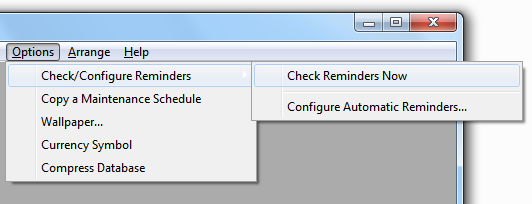
Or click on 'Check/Configure Reminders' and then click 'Configure Automatic Reminders' to modify when automatic reminders are displayed. Read the related topic below for more on this.
Related topic: How to Configure Automatic Reminders