Return to User Guide Main Menu

Contents - Index


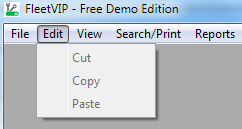
Edit Menu


(Click on a top row menu option in the screen shot above to change menu category.)


Cut, Copy and Paste


The edit menu options are enabled whenever there is some text highlighted that can be cut, copied, or pasted.  For example, when you are using a Notes tab, you can highlight text and then cut, copy or paste from there to someplace else in AutoVIP or another windows program.


AutoVIP and FleetVIP are compatible with Microsoft Windows 7 / Vista / XP operating systems.

AutoVIP and FleetVIP are trademarks of Alembx Solutions LLC - Denver, Colorado - (866)840-7025
© Alembx Solutions LLC - All rights reserved. Terms of Use   Policies