Backup Reminders
The Backup screen is accessed from the 'Backup data' option under the File menu of the main window.
FleetVIP can remind you to backup the database. You specify how often to be reminded. FleetVIP keeps track of how many times you have opened the program.
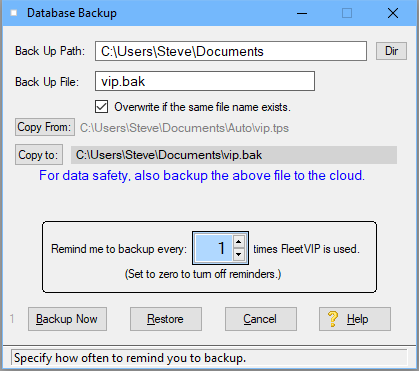
Example: If you want a reminder every time, set the reminder frequency to 1. The program then pops-up the backup window shown here after every program session ends. It does this when you exit the program. You simply confirm the backup file name and path and click the 'Backup Now' button.
Backup the FleetVIP database often. By doing regular backups, you have very little risk of having to reinstall FleetVIP and re-enter all of your data when a power outage or hard drive crash strikes.
It is highly recommended to send the backup folder (or at least the vip.tps file) to a cloud backup service such as BackBlaze.com or Google Drive.
Visit the Demo Video page on our website to see how easy cloud backup can be.
Do backups before a problem occurs but not after a problem occurs until the problem is resolved.
HERE'S WHY: Suppose the power goes out while using FleetVIP. In that scenario, your database might be corrupted. If you backup after every use, you might back up the corrupted database at the next use and overwrite the last good backup. So be careful about doing backups after a problem occurs.
If you decide to backup after a problem arises, make sure the 'Overwrite same file' box is not checked and either use a different backup name or a different path so you don't overwrite a previous backup. Or use a cloud backup service that keeps multiple versions of your files.
Backup Options:
You can specify the drive, path and file name of the backup file. The button to the right of the Back Up Path entry lets you pick the backup drive and directory path from a directory tree layout of your computer.
If you specify nothing, the program defaults to the Documents folder with a file name of VIP.BAK.
If you type in a path name, make sure it is a valid path, or you will get an error when you try to backup.
If you re-use the same backup path and file name, the program warns before overwriting the old backup file. You can turn off this warning if you check the overwrite box. That is more convenient but not as safe. Do so at your own risk.
If you never want to be reminded to do a backup, set the reminder count to zero. You might want to do this if you have a separate backup program that backs up the FleetVIP database.
Related Topic: How to restore the database